


“I can use AI well enough myself, but the moment someone asks me how much I should hand over to my team, I find myself rather lost for an answer.”
That is roughly how Sato, a sales director at a manufacturer (an illustrative example), put it during a planning meeting for a management training programme. Six months earlier, junior staff at the company had begun using generative AI to draft minutes and proposals, while the section-head tier had yet to spell out which tasks were fair game, where a human ought to check the work, and who carried the can when something went wrong. The views of frontline staff, HR and the IT department were not aligned either.
As an illustrative example, the company is now at a point where, over the past three months and across thirty managers, it has built pre-delegation checks, the review of AI output, feedback in one-to-ones, and the handling of confidential information into its management training, and is trialling AI usage rules team by team.
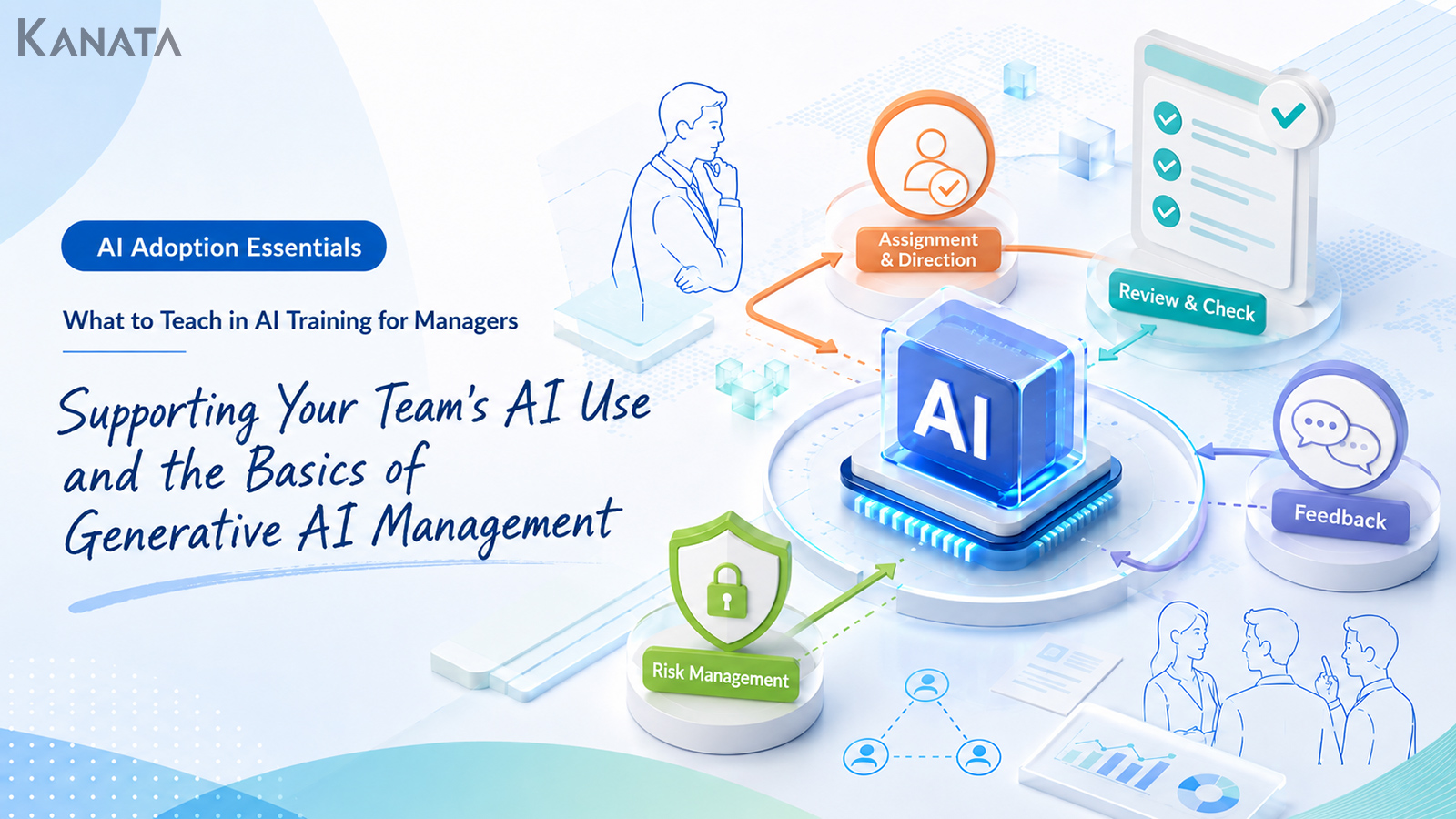
This article sets out what manager AI training should teach about supporting your team’s AI use, organised into four parts: delegating, reviewing, feedback and risk management. The aim is not to leave it to each individual whether or not to use AI, but to get to a state where managers can articulate the purpose of the work, the scope they are handing over, and the standards by which it will be checked.
That said, training alone will not embed AI use on the ground. Pair it with operating rules, shared prompts and regular reflection, and design something that genuinely fits your own organisation.
Why Manager AI Training Needs to Cover Supporting Your Team’s AI Use

In-house generative AI training tends to begin with the basics of operating ChatGPT, how to write prompts, and use cases you can apply at work. Giving every employee a grounding in AI matters. Once you reach the stage of broadening AI use on the ground, however, that alone is not enough.
The reason is that, when a team member uses AI, the question is not simply whether they can operate it; judgements of the following sort arise.
- Is this task one we should be handing to AI at all?
- How far can we trust what the AI has produced?
- How should a manager check a deliverable a team member produced with AI?
- How much customer information or internal material is it acceptable to enter?
- If a mistake arises because AI was used, who is accountable?
These are not matters that frontline staff can settle on their own. They are themes that involve managers, HR, IT, legal and, in some cases, the leadership team.
Section heads and directors in particular need not only to understand AI as a tool they themselves use, but to build it into how they design their team’s work, manage the quality of deliverables and manage information risk.
In other words, the purpose of manager AI training is not to turn managers into advanced AI users. It is to enable them to design how work is delegated and how it is checked, so that their team can use AI safely and in a way that suits real work.
The Ground Rules of AI Use Every Manager Should Grasp First

The first thing manager AI training should address is the ground rule of what you hand to AI and what people take on. As the OECD’s principles for trustworthy AI underline, accountability and human oversight remain firmly with people, a point worth keeping front of mind here. See the OECD AI Principles.
A sensible division is to let AI take on drafting, summarising, tidying up and the groundwork of research, while fact-checking, final judgements and relationship-bound conversations stay with people. That same thinking carries straight across into management training.
Work That Is Easy to Hand to AI
What lends itself to AI is mainly the work of producing first drafts, organising information and polishing how something reads.
For example, tasks such as these.
- Turning meeting notes into a draft set of minutes
- Producing an outline for a proposal
- Drafting several versions of an email
- Reshaping one-to-one notes into a form that is easy to reflect on
- Laying out the points of a decision in a comparison table
- Rewriting an internal explanation so it reads more clearly
These play to AI’s strengths. Rather than a person starting from a blank page, it can be more efficient to have AI produce a first draft and let a person revise it to fit the purpose.
Work That People Should Own
On the other hand, there is work you must not hand over to AI wholesale.
- Judgements that turn on the relationship with a customer or a team member
- Judgements bound up with appraisal or treatment of staff
- Final decisions on contracts, legal matters or compliance
- The final sign-off on anything that goes outside the organisation
- Checking figures, proper nouns, dates and sources
- Setting team direction and priorities
AI can produce plausible prose. What it cannot do is shoulder the organisation’s responsibility. Even where a team member is using AI, the final judgement and the accountability must rest with a person.
In management training, the important thing is not to leave this line-drawing as an abstraction, but to work it through against your own organisation’s tasks.
Skill 1, “Delegating”: Handing Your Team Work Designed Around AI

The first skill a manager should acquire is delegating work to the team.
By delegating, I do not mean simply saying “use AI to get this done.” It means handing over, as a set, the purpose of the work, the scope you are entrusting, the standards for checking, and what is off limits, all on the assumption that AI will be used.
“Just Use AI for It” Is Not an Instruction
Are you, perhaps, giving your team instructions like these?
- “Pull these minutes together with AI, would you.”
- “Knock up a first cut of the proposal with AI.”
- “Give me a rough competitor scan from AI.”
At first glance this looks like encouraging AI use. On its own, though, it leaves the team member at a loss.
Which information may be entered. At what level of detail the output should come back. How far they should revise what the AI produced. What the manager will be looking at when judging it. Without these standards, a team member is left uneasy even after using AI.
The Four Things a Manager Should Hand Over
When you delegate work designed around AI, hand over at least these four things.
- Purpose: be clear about what the AI is being used for. Drafting minutes, organising the points of a decision, or producing a draft for an external-facing message all call for a different approach.
- Output format: specify whether you want bullet points, a table, something under 300 words, or a format that matches a meeting template.
- Checking standards: set out the review points up front, such as verifying figures against the source, masking customer names, and flagging anything unconfirmed as “to be checked.”
- What is off limits: rules such as not entering personal data, not entering unpublished information, and not submitting AI output externally as is.
Handing over just these four things moves the team’s AI use closer from “individual ingenuity” to “a managed work process.”
A Sample Training Exercise
The following exercise works well in management training.
First, pick one task you usually delegate to your team, such as “drafting the minutes of a sales meeting,” “producing the first draft of a new proposal” or “tidying up team members’ weekly reports.”
Next, write the instruction for delegating that task on the assumption that AI will be used.
For minutes, for example, it looks something like this.
Using today’s sales meeting notes, please draft minutes for internal circulation.
The purpose is to leave anyone who was absent able to grasp the decisions taken and the next actions.
Organise the output under four headings: “Overview,” “Decisions,” “To-dos” and “Open items.”
Where figures, dates or owners are unclear, mark them “to be checked.”
If customer names appear, bear in mind it may be forwarded outside the company; I will review it before any formal submission.
Getting managers to the point where they can write that kind of “instruction for putting AI to work” is the first step of the training.
Skill 2, “Reviewing”: Checking Whether AI Output Is Fit for Use

Next comes reviewing AI output.
I use the word reviewing, rather than proofreading, deliberately: this is more than catching typos. It means checking AI output against the purpose of the work, whether the facts are right, and whether there is any risk.
Don’t Judge AI Output by How Well It Reads
AI’s prose can be smooth and well ordered. But reading well and being right are two different things.
What a manager should be checking is not merely how natural the writing is.
- Does it match the purpose?
- Has any important point been left out?
- Are the figures and proper nouns correct?
- Have fact and conjecture been blended together?
- Has work the team member ought to be thinking through been handed to AI as well?
- Is there any wording that would mislead if it went outside the organisation?
Proposals, appraisal comments, contract-related documents and customer-facing emails, in particular, should not be used straight from an AI first draft.
Before any AI output goes outside the organisation, it is good practice to reconcile proper nouns, figures and dates against the original source, to strip out over-assertive or exaggerated language, and to put it through a human review. The US National Institute of Standards and Technology’s AI Risk Management Framework offers a useful structure for building these checks into a repeatable process. See the NIST AI Risk Management Framework.
Five Lenses for the Review
In management training, making the lenses for checking AI output concrete makes them easier to carry into real work.
| Lens | What to check |
|---|---|
| Fit for purpose | Check that the output is genuinely useful for the purpose it was asked for. |
| Fact-checking | Reconcile figures, dates, customer names, product names and scheme names against the original source. |
| Missing points | Check that, in tidying things up so neatly, the AI has not in fact dropped an important point. |
| Wording risk | Check that it is not over-assertive, that it will not mislead, and that it suits the relationship with the recipient. |
| Scope of responsibility | Check that a judgement the AI produced has not simply been adopted, and that the points a person should decide are still left to a person. |
A Sample Training Exercise
In training, it works well to hand out a piece of mock AI output and have managers review it.
For instance, show part of an AI-produced proposal and have them mark it up against the following lenses.
- Over-assertive wording
- Figures that need a source
- Places too thinly grounded to assert as a customer problem
- Proper nouns to check before it goes outside the organisation
- Points to send back to the team member
- Points the manager should decide themselves
Through this exercise, managers develop an eye for AI output.
Skill 3, “Feedback”: Developing Your Team’s AI Use

As AI use spreads on the ground, a manager needs to give feedback not only on the team’s deliverables but on the way AI itself is used.
Under conventional management you might have told someone to “be more specific,” that “the grounds here are weak,” or that “this wording will not suit the customer.” In the age of generative AI, you add another layer on top: how was the AI asked, where did the person revise it, and what did they check?
Looking Only at the Deliverable Misses the Chance to Develop People
Work produced with AI tends to arrive looking reasonably polished. As a result, at first glance it can look as though a team member’s understanding has deepened.
In reality, they may be pasting in the AI’s output having barely read it. Or, conversely, they may be using AI as a sounding board and sharpening their own thinking. That difference is hard to spot from the final deliverable alone.
A manager needs to put questions like these to the team.
- How did you first ask the AI?
- Which parts of the output did you keep, and which did you discard?
- Where did you add your own judgement?
- How did you verify anything uncertain?
- How might you improve the prompt next time?
Through these questions, AI use becomes more than mere time-saving; it turns into a chance to develop your team’s thinking and grasp of the work.
Not “Don’t Use AI” but “Improve How You Use It”
When a manager is uneasy about a team member’s AI use, it is tempting to say “did you make this with AI?” or “aren’t you leaning on AI too much?”
Put that way, though, people simply start hiding that they used AI. Hidden AI use is a risk to the organisation. It is safer, on the contrary, to build a state in which people can speak openly about how they used AI, on the assumption that they did.
In feedback, framings like these work well.
“Using AI is not a problem in itself. That said, this figure needs checking against the source.”
“As an outline it works. But making it specific to the customer’s situation is for a person to do.”
“Next time, try settling on three criteria for your judgement before you reach for AI.”
In this way, rather than banning AI use, you give feedback that raises the quality of how it is used.
A Sample Training Exercise
In training, practise how a manager would give feedback in a one-to-one on a mock deliverable a team member produced with AI.
For instance, picture a team member bringing in an AI-produced recap of a sales call.
The manager builds questions like the following, rather than dwelling only on whether the deliverable is good or bad.
- Before producing this note, what context did you give the AI?
- Which parts of the AI’s output did you revise yourself?
- Are you separating what the customer said from your own conjecture?
- Heading into the next meeting, what are the points a person should think through?
Through this exercise, managers connect AI use to developing their people.
Skill 4, “Risk Management”: Deciding What Information May and May Not Be Used

In AI use, risk management is something a manager cannot sidestep.
What matters most is drawing the line between information that may be entered and information that should be avoided. On the ground, people hesitate over things like “may I put this document in?”, “is it fine if I redact the customer name?”, and “may I summarise the recording of an internal meeting?”
If the manager stays vague at this point, the team ends up using AI on their own judgement.
Treat Information Differently by Type
In management training, it helps to broadly classify information along the following lines. Where personal data is involved, the UK Information Commissioner’s Office offers detailed guidance on AI and data protection that is worth consulting. See the ICO guidance on AI and data protection.
- Public information
- Press releases, official websites, published investor materials and the like, which are comparatively easy to handle.
- General internal information
- Internal policies, work manuals, internal FAQs and so on. These need to be handled having confirmed the assumptions around the in-house AI environment and access controls.
- Customer information
- Deal history, proposal contents, contract terms and the like. Check NDAs, contract terms and internal rules, and mask where necessary.
- Personal, sensitive and unpublished information
- Personal data, sensitive information, unpublished financial information, HR information and so on are, as a rule, information whose entry should be avoided.
As a matter of good practice, personal data is in principle off limits, and sensitive information and unpublished financial information are prohibited.
Risk Management Will Not Stick on “Prohibition” Alone
If, out of fear of the risks of AI use, you draw up rules that amount only to “just don’t use it” or “never put any internal material in,” they can end up out of step with real work on the ground.
What matters is presenting what is off limits and what may be used as a set.
For example, organise it like this.
- Mask personal names, writing them as a job title or “person A”
- Replace customer names with an industry or company-size descriptor
- Use a range rather than a specific figure for amounts
- Do not enter unpublished information
- If in doubt, do not enter it
- Always have a person review anything before external submission
To make the rules genuinely usable for your team, it matters to show not just “what is not allowed” but “how it can be used.”
A Sample Training Exercise
For the risk-management part of the training, run an information-classification exercise.
Hand participants information cards such as the following.
- A published product page
- An internal sales manual
- A note from a customer call
- An appraisal comment containing a personal name
- An unannounced sales forecast
- An internal FAQ
- A draft contract clause
- A customer contact’s name and details
Have them sort these into “may be entered,” “may be entered with conditions” and “may not be entered,” and discuss the reasoning.
Through this exercise, managers become able to explain it to their team in their own words.
The Backbone of a Manager AI Training Programme

As we have seen, manager AI training cannot get by on operating instructions for AI alone. It needs to cover how to delegate to your team, how to check the work, how to develop people, and how to keep things safe.
Here is a sample structure built around a session of roughly three hours. The figures are purely illustrative.
Part 1: The Manager’s Role in Generative AI Use
Start by setting out the manager’s role in generative AI use.
What you want to get across here is that a manager need not become an AI specialist. At the same time, that does not mean leaving the team’s AI use to its own devices.
The manager’s role has four parts.
- Separating work to hand to AI from work for people to own
- Giving the team work instructions that assume AI use
- Reviewing AI output from the standpoint of work quality
- Managing information risk and the scope of responsibility
Putting this framing first positions the whole programme as management training rather than a tool tutorial.
Part 2: Delegation and a Prompt-Design Exercise
Next, run an exercise in designing instructions to the team on the assumption that AI will be used.
Here, managers writing prompts themselves matters, but more than that, the aim is to get them thinking about what context they should hand their team.
A workable set of prompt-design elements is the role, the purpose, the intended reader, the background information, the output format and the constraints.
Using these six elements makes it easier to apply prompt design in real work.
For instance, for the task of “asking a team member to run a competitor scan,” break it down like this.
- Role: a market researcher in a B2B business
- Purpose: to organise the points for deciding the next proposal’s direction
- Intended reader: the sales manager and the responsible director
- Background information: the target industry, the competitors to compare, the customer’s problem
- Output format: a comparison table and a summary of key points
- Constraints: figures need a source; note anything unclear as “to be checked”
Once a manager grasps this template, their instructions to the team become more specific too.
Part 3: An AI-Output Review Exercise
In Part 3, review AI-produced output.
For the exercise, prepare AI output that deliberately contains problems. For example, things like these.
- A market size with no source
- An over-assertive customer problem
- A call recap that blends fact and conjecture
- Minutes that look tidy but leave out a key point
- Wording too lacking in tact to serve as an appraisal comment
Participants check these through a manager’s eyes and work out where to revise, where to send the work back to the team member, and where they themselves should decide.
Through this exercise, they learn to look at AI output not in terms of “is it well written?” but “is it fit for use at work?”
Part 4: Connecting to Feedback and One-to-Ones
In Part 4, address feedback on a team member’s AI use.
Here, picture scenes like these.
- A team member brings in a proposal made with AI
- A team member uses an AI summary to organise a meeting’s contents
- A team member leans on AI too heavily and produces a deliverable thin on their own thinking
- A team member submits a deliverable without saying they used AI
Rather than scolding or banning, the manager has a conversation aimed at improving how it is used.
“What did you ask the AI?”
“Which output did you adopt?”
“Where did you bring in your own judgement?”
“How might you improve next time?”
Building questions like these into one-to-ones makes AI use part of developing your people.
Part 5: Drawing Up Team Rules
Finally, have participants draw up the AI usage rules for their own team.
The rules need not be perfect from the outset. It is more practical to start with the bare minimum, on the assumption that you will update them as you go.
The first items to settle are along these lines.
- Work AI may be used for
- Work that needs the manager’s sign-off
- Information that must not be entered
- The review procedure before external submission
- How to share frequently used prompts
- Items to revisit monthly
Drawing up these rules within the training makes it more likely to translate into action afterwards.
Operating Rules for Embedding AI Use Across the Team

Manager training is not over once people have attended. It only means something once it is put into practice on the ground.
Here, we set out the operating rules for embedding AI use across the team.
Stick to One Topic per Chat
In a conversation with AI, mixing several topics into one chat tends to muddle the context.
Running one chat per topic is a sound basic principle.
A manager would do well to tell the team to keep separate chats by “deal,” by “meeting” and by “purpose.”
Share the Prompts That Worked
If AI use stays confined to each individual’s ingenuity, the team’s overall productivity is unlikely to rise.
For frequently used work such as minutes, proposals, call recaps, one-to-one preparation and appraisal comments, it matters to keep the prompts in a form that can be shared.
One approach is to store prompts and reference material in a shared project library and reuse them within the project.
Even where you use a mechanism like this, you need a practice of checking the contents, the confidentiality classification and the intended use before anything is registered.
Revisit the Rules Monthly
AI usage rules are not a case of “set it and forget it.” The work involved, the tools used, internal policy, and the thinking on legal and security matters can all change.
For that reason, it is worth spending a short slot of around 15 to 30 minutes once a month checking the following items. The timing is illustrative.
- The AI usage patterns that came up often
- Prompts that worked well
- Input information that gave you a scare
- Output that was sent back frequently in review
- Items to add to the rules
- Reference material or templates to delete or update
Keeping up these small reviews moves AI use away from being a personal habit and closer to a team-wide standard for the work.
Elements You Can Build Into Manager Training When Using Kanata

Everything so far is the basic design of a manager AI training programme that does not depend on any particular tool.
On top of that, when you use Kanata, there are several elements you can build into the training.
Kanata is described as a work-support platform offering AI chat, AI summarisation, e-learning and more. Its operating manual covers features such as AI chat, AI summarisation, project management, a project library and e-learning.
Use AI Chat to Practise Instructions and Reviews
AI chat can be used to practise writing instructions to the team and to organise the lenses for reviewing AI output.
In manager training, for example, participants take their own team’s work as the subject and write prompts like this.
You are a sales manager.
You are asking a team member to produce a first cut of a proposal for a new prospect.
Please produce a brief that includes the purpose, the output format, the checking standards and what is off limits.
This kind of practice lets managers sharpen the precision of the instructions they give their team.
Use AI Summarisation to Structure Minutes and One-to-Ones
AI summarisation can be used to organise meeting recordings, notes and materials.
For AI summarisation, the inputs include documents, images, audio, URLs and text, and a custom mode lets you specify the summary style with a free-form instruction.
In manager training, you can make this an exercise, using meeting notes or one-to-one notes, in working out what format of summary is most usable for management.
Use E-Learning to Design Post-Training Review
Kanata’s e-learning function offers video content and an “ask the AI” route while you are working through it.
To stop manager AI training from being a one-off, it is effective to turn the training videos, the rules, the checklists and the frequently asked questions into e-learning so they can be revisited later.
That said, introducing Kanata will not embed AI use automatically. A tool is, in the end, a means of supporting the training content, the operating rules and reflection on the ground.
Common Pitfalls and How to Avoid Them

Manager AI training has a few recurring failure patterns. Knowing them in advance lets you raise the precision of your training design.
Pitfall 1: Managers Learn Only How to Use AI Themselves
It matters for managers to become able to use AI themselves. On its own, though, that does not translate into supporting the team’s AI use.
Training must always broaden out from “I use it” to “I get my team to use it,” “I check my team’s output” and “I draw up team rules.”
Pitfall 2: The Risk Talk Becomes Nothing but Prohibitions
Explaining the risks matters. But if you convey only what is off limits, people on the ground find AI hard to use.
Alongside “information you must not enter,” show “information you can handle if you mask it,” “work you can do if you clear it internally,” and “deliverables you can use on the assumption of a human review.”
Pitfall 3: Good Prompts Stay in Individual Hands
In a team where AI use is advancing, a “way of asking that worked” inevitably emerges. Leave it confined to a personal note and the team’s overall pace of learning will not pick up.
Build a mechanism to share good prompts across the team and update them as needed.
Pitfall 4: Responsibility for AI Output Becomes Vague
Responsibility can blur on the grounds that “the AI produced it.”
This must be avoided. Anything that goes outside the organisation, anything sent to a customer, and any document bound up with appraisal or contracts must always be checked by a person and handled with a clear owner.
Pitfall 5: No Follow-Up After the Training
Right after training, participants are keen. Back on the ground, though, day-to-day work takes over and what was learned fails to stick.
As an illustrative example for the 30 days after training, it is worth designing follow-up like this.
- Week 1: each manager tries an AI-use instruction on one piece of work
- Week 2: bring along examples of reviewing AI output
- Week 3: produce a first version of the team rules
- Week 4: share the prompts that worked and the sticking points
Designing through to post-training action like this is what leads to it sticking.
In Summary: Manager AI Training Teaches the “Shape of Support,” Not Just “How to Use It”

What matters in manager AI training is not how deftly the manager can use AI themselves.
How to delegate work designed around AI to the team. How to review AI output. How to develop the team’s way of using it. How to manage information risk. The point is to make these four things something managers can handle as part of real management work.
Generative AI can speed up your team’s work. But leave the manner of its use to each individual and you also invite problems: uneven quality, information leaks, and a blurring of who is accountable for a judgement.
That is exactly why a manager is asked to be not “a person who uses AI” but “a person who designs work around AI.”
There is no need to build perfect rules across the whole company from the start. Begin with one team, one task, one prompt. Share what you learn there, revisit it, and broaden it to the next piece of work. That accumulation is what grows an organisation’s management of generative AI.
Q&A: common questions on manager AI training and supporting your team’s AI use
What should manager AI training cover?
Manager AI training should cover more than how to operate an AI tool. It should help managers understand how to delegate work on the assumption that AI may be used, how to review AI output, how to give feedback on the way their team uses AI, and how to manage information risk. The aim is not to turn every manager into an advanced AI user, but to enable them to design work, set checking standards and support safe AI use across the team.
What should a manager tell a team member when asking them to use AI?
A manager should not simply say, “Use AI for this.” They should explain the purpose of the task, the expected output format, the standards for checking the result, and any information that must not be entered into the AI tool. For example, when asking someone to draft meeting minutes, the manager might specify the headings to use, the points that need verifying, and whether customer names or sensitive details should be removed before the output is shared.
Can AI-generated text be used as it is?
In most business settings, AI-generated text should be treated as a first draft rather than a finished deliverable. Even if the wording reads well, a person still needs to check the facts, figures, dates, proper nouns, tone and suitability for the intended reader. This is especially important for customer-facing documents, proposals, appraisal comments, contract-related material and anything that may leave the organisation.
What information should not be entered into AI tools?
Personal data, sensitive information, unpublished financial information, HR information, detailed customer information and contract-related material all need careful handling. As a general rule, personal, sensitive and unpublished information should not be entered into AI tools. Where information can be used only with conditions, it should be masked or generalised, for example by replacing names with roles, company names with industry descriptions, and exact figures with ranges where appropriate.
Is one manager AI training session enough to embed AI use in a team?
One training session is rarely enough on its own. To make AI use stick, managers need to connect the training to everyday work. That may mean trying AI on one team task, reviewing AI-generated output together, sharing prompts that worked, and revisiting team rules regularly. A short monthly review of usage patterns, risks, useful prompts and points that need updating can help move AI use from individual habit to a managed team practice.